Hey everyone!
I’ve started my internship at KDAB this week, it’s great fun so far! Though I spent most of my time this week on Bertjans KDevelop plugin, I couldn’t resist on a bit of Kate hacking:
steveire is experimenting with QML so I couldn’t stop but notice that there is no highlighting for it in Kate. Well, there was none ;-) Now you get pretty colors, rejoice!
Note: Since QML is basically JSON with some added sugar, I reused the existing JavaScript highlighter and improved it. Hence you get imrpoved JSON and member highlighting in plain.js as well. Enjoy!
continue reading...
Hey all,
I’ve improved my javascript highlighter for backtraces on bugs.kde.org and fixed some bugs (e.g. the BUG 123456 links where lost before). Additionally I just added another feature that gives you a nice little navigation bar like this:
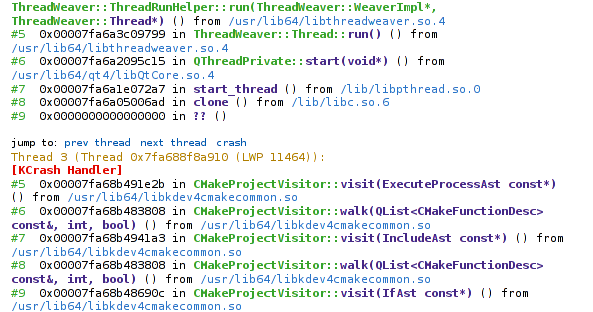
highlighted backtrace with navigation bar
Pressing crash scrolls the window to the [KCrash Handler] in that backtrace, prev thread and next thread do what you would think they do.
To get all the goodies, click this link to install the updated script in GreaseMonkey:
http://users.physik.fu-berlin.de/~milianw/bko_highlighter.user.js
NOTE: This also works with Tampermonkey in Chromium!
Happy backtrace reading!
PS: Yeah, we really should get this by default into BKO… I’ll write a mail to the sysadmins now.
continue reading...
During the sprint in Vienna last year, Aleix and me laid the ground work for a QML/JS language support plugin for KDevelop. Sadly we two only have very limited time working on fancy new features such as that.
Thankfully someone stood up and started contributing - none other than Andrea Scarpino of ArchLinux KDE/Qt packaging fame. With some help of me and Sven he managed to get the JavaScript support into a much more shiny state - behold:
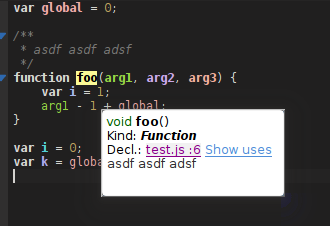
Colorful JavaScript Analysis in KDevelop
For simple JavaScript files we already have proper context browsing, uses and declarations. And all that in just a few lines of code thanks to the good work of the QtCreator team, whose JavaScript/QML parser we use (which is the one of the most complicated parts of a language support plugin). Thanks again, guys!
continue reading...
Hello everyone, the “I can syntax highlight everything” guy speaking again :)
Yeah, I couldn’t sleep well after I put colors on Dr Konqi. I also did the same for Kate, if you did not notice it. There is a new GDB Backtrace syntax highlighting file for it, giving you the same pleasant experience you are now used to from Dr Konqi. Awesome.
But well, lets admit it: What use are these two for bug triaging? Visit any crash report on bko and you are left to plain old black-on-white… Stone-age stuff, lets put it on LSD, shall we not? I propose: The GDB Backtrace highlighter GreaseMonkey userscript!

Download User Script (Requires GreaseMonkey 0.8 or higher)
Bug reports, feedback, pizza & beer all welcome :)
continue reading...
Hey ho everyone.
Dominik asked me to blog about a feature in Kate that is still (sadly!) pretty unknown and seldom used: Kate Scripting. As you should know you can script KatePart completely via JavaScript. As those articles explain, it’s rather simple to write functions and put them into a file to have them reusable. But what for those write-use-throwaway kind of cases, where you simply need to get a job done quickly and don’t want to go through the overhead of writing some full fledged, documented, action-binded, localized script?
Utility Functions and why JavaScript rocks
Note: Neither map nor filter will be shipped with 4.5 to my knowledge, sorry about that. But you can still use the each helper (see below) to achieve the same with a bit more typing…
continue reading...
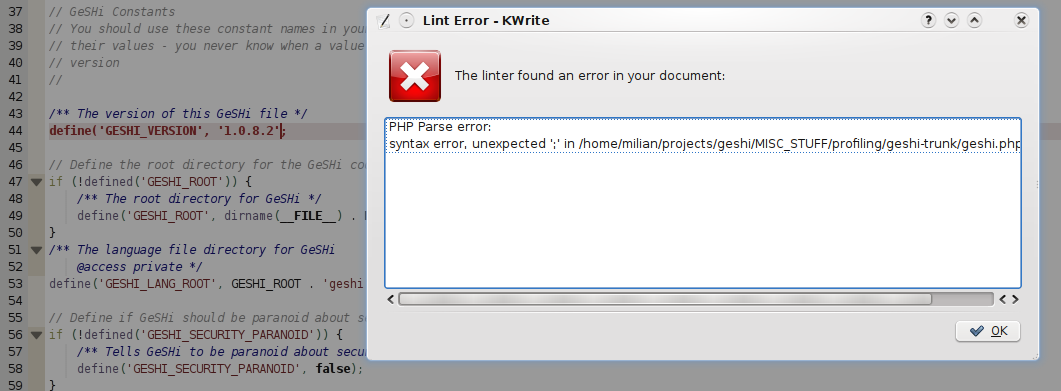
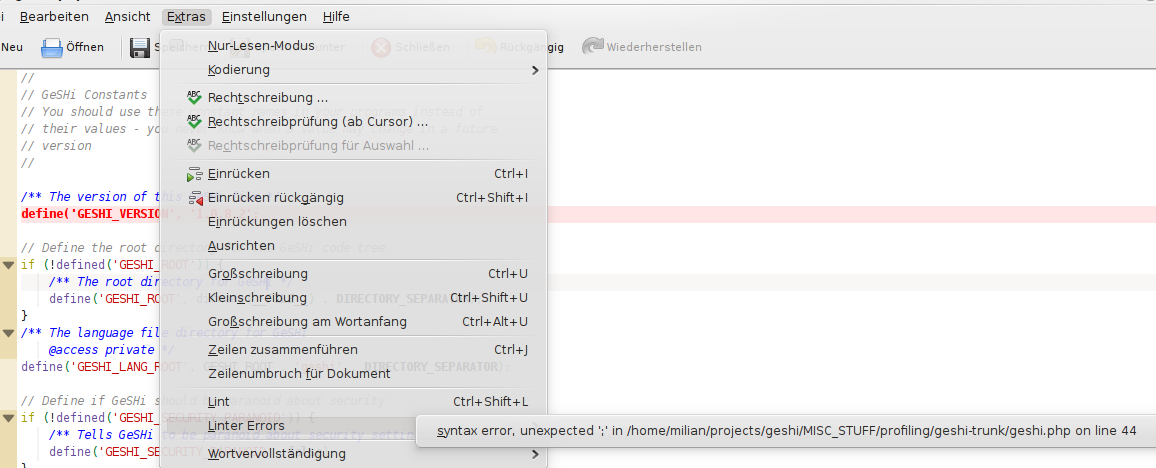
Just a quicky: I wrote a little plugin for KTextEditor which supplies you with basic error checking when you save documents. Currently only PHP (via php -l) and JavaScript (via JavaScript Lint) are supported.
Screenshots
Requirements
- usual tools for compiling C++, e.g. gcc.
- cmake
- Qt development packages, i.e. under Ubuntu:
sudo aptitude install libqt4-dev - KDE 4.2 with development packages for kdelibs and kdebase, i.e. under Ubuntu:
sudo aptitude install kdebase-dev kdebase-workspace-dev kdelibs5-dev. Note: You’ll need the experimental KDE 4.2 packages activated as of now, see for example the Kubuntu news on KDE 4.2 RC1 for hints. - proper setup of environment variables, read this techbase article for more information. the
.bashrc linked there should be enough for most people - For PHP support: a PHP executable which supports the
-l switch for linting - For JavaScript support: a JavaScript Lint executable, you could download and compile the sources for example.
continue reading...
Not only KDevelop gets better and better PHP support — the Kate PHP syntax file also got a few new features and fixes over the last weeks. The good thing is of course that all users of KWrite, Kate, Quanta, KDevelop and other editors leveraging the Katepart benefit from these changes.
Improved HereDocs

screenshot of improved highlighting in PHP heredocs
I went over PHP related bugs on bugs.kde.org today and spotted one that was fairly easy to fix:
continue reading...
Yes I know it is pretty darn late but hey - what else are holidays there for? Except learning and partying and dancing and chilling and… well yes I just could not stop until it worked like I wanted it to.
My TypoGridder now works as a MiniTool for Konqueror and as a bookmarklet in Firefox and Opera. It should have the correct height on any page and should be on top of everything. Please test it and report any bugs.
Visit TypoGridder project Page
continue reading...
I recently read two articles about using grids in webdesign. It just makes sense. Read them yourself:
I’ve wrote a little javascript which displays a basline grid on any page (via bookmarklet). For more information visit the project website.
Please use this article for any feedback.
PS: And as you might see, I have a lot to do to let my website align to any grid. The curse of a layman.
continue reading...
I recently read two articles about using grids in webdesign. It just makes sense. Read them yourself:
I’ve wrote a little javascript which displays a basline grid on any page (via bookmarklet). For more information visit the project website.
Please use this article for any feedback.
PS: And as you might see, I have a lot to do to let my website align to any grid. The curse of a layman.
continue reading...