Git commit message highlighting in nano
For those who use nano as their CLI editor of choice: Here’s a syntax highlighting file for Git commit messages which also supports the special KDE commit hook keywords.
    ##  syntax highlighting for git commit messages of KDE projects
    syntax "patch" ".git/COMMIT_EDITMSG$"

    # overlong lines
    color brightred "^.{70,}.+$"

    # KDE commit hook keywords, see: http://community.kde.org/Sysadmin/GitKdeOrgManual#Commit_hook_keywords
    color yellow "^(FEATURE|BUG|CCBUG|FIXED-IN|CCMAIL|REVIEW|GUI|DIGEST):.*$"
    color yellow "(SVN_SILENT|GIT_SILENT|SVN_MERGE)"

    # comment
    color blue "^#.*$"

    # special comment lines
    color green "^# Changes to be committed:"
    color red "^# Changes not staged for commit:"
    color brightblue "^# Untracked files:"
    color brightblue "^# On branch .+$"
    color brightblue "^# Your branch is ahead of .+$"

    # diff files
    # meh - cannot match against \t ... should be: ^#\t.*$
    color cyan "^#[^ a-zA-Z0-9][^ ].*$"
Just put this file as gitcommit.nanorc or similar somewhere on your disk and load it from your .nanorc or even /etc/nanorc like this:
include "/path/to/gitcommit.nanorc"
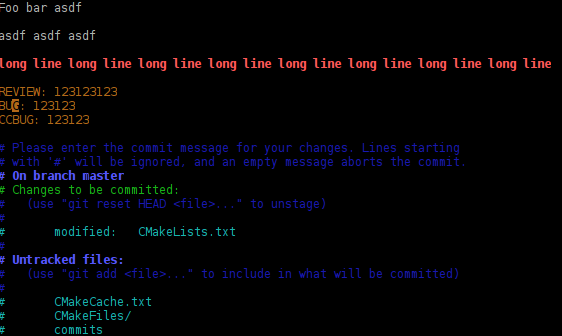
Screenshot of highlighted git commit message
Comments
Want to comment? Send me an email!
Comment by Anonymous (2014-07-31 17:16:00)
Use [^[:space:]] or [[:space:]] for \t More info search for “bash regex space or tab”
Comment by Nicolas (not verified) (2012-11-24 20:53:00)
It’s news to me that nano has syntax highlighting.
Comment by Milian Wolff (2012-11-24 21:57:00)
Take a look at the bottom of
/etc/nanorcand the files available in/usr/share/nano/and on the web (including my website).Cheers
Comment by christoph (not verified) (2012-11-24 17:31:00)
Merci, it is possible to alert the user, if the second line is not empty?
Comment by Milian Wolff (2012-11-24 21:58:00)
Afaik not, since nano highlighting is done on a line-by-line basis. Thus I cannot figure out on which line I am…
I’d be happy to be proven wrong though, esp. if that would mean we could also add a special highlighting for the very first line.
Cheers